Some terminology
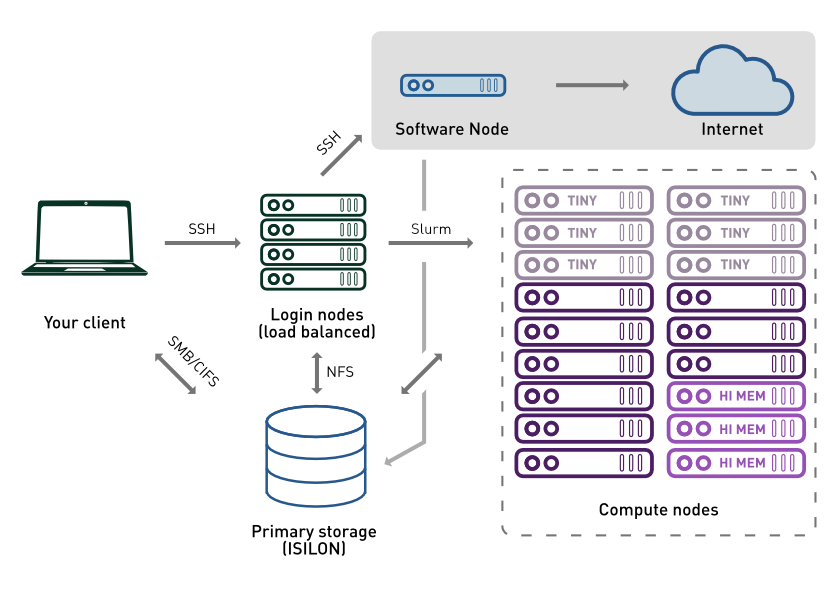
The reception of an HPC is one (or more) submission nodes, also called login nodes: it’s where you enter after connecting to the HPC. These are only used to orchestrate jobs and should never used to run any command.
⚠️ In the NBI HPC any command taking more than 60 seconds to complete will be automatically killed, so even “cp”, for large files, is not allowed!
Loggin in
From the NBI network (or using the VPN), open a terminal and login with:
# From your personal computer terminal
ssh username@hpc.nbi.ac.uk
You will be asked your NBI password and you should then be able to login. If you type hostname you should see that you are now in a different computer, called sub01 to sub04 (there are four login nodes, behind a load balancer).
To avoid typing the password we can logout (type logout or exit), and then
# From your personal computer terminal
ssh-copy-id username@hpc.nbi.ac.uk
Interactive sessions
Sometimes you need to work directly on a compute node — to test a command, debug a script, or run something that requires more resources than the login node allows. For this, the NBI HPC provides the interactive command, which requests a dedicated session on an interactive partition.
When you type interactive, Slurm allocates a compute node for you and drops you into a shell on that node. It’s like SSH-ing into a server, but managed by the scheduler. This ensures you get dedicated resources without interfering with other users.
By default, an interactive session gives you modest resources: 2 GB of memory, 1 CPU core, and a 3-day time limit. For quick tests, this is often enough! But when you need more, you can customise your request:
| Parameter | Short | Description | Default |
|---|---|---|---|
--mem |
-m |
Memory allocation (e.g., 8g, 16g) |
2g |
--cores |
-c |
Number of CPU cores | 1 |
--time |
-t |
Maximum duration (e.g., 4:0:0 for 4 hours, 1-0 for 1 day) |
3-0 (3 days) |
For example, to request 8 GB of RAM and 4 cores for 6 hours:
interactive -m 8g -c 4 -t 6:0:0
You can also run a single command directly without entering an interactive shell:
interactive -m 16g -c 8 samtools view -b input.sam > output.bam
A few things to keep in mind:
- Graphical applications are better run on your desktop — X11 forwarding over an interactive session can be slow and unreliable
- Interactive sessions are great for testing, but for real analysis, batch jobs (
sbatch) are more robust and efficient - ⚠️ Remember the time limit of the shell
Think of interactive as a quick way to “borrow” a compute node for hands-on work — useful, but not a replacement for proper job submission.
Try yourself
- Launch an interactive sessionhostname
- Type
hostnameto check that you are indeed in a different computer