Generating Consistent Illustrations for Presentations
The source for the script is available from Gist. A screenshot of produced images is available here
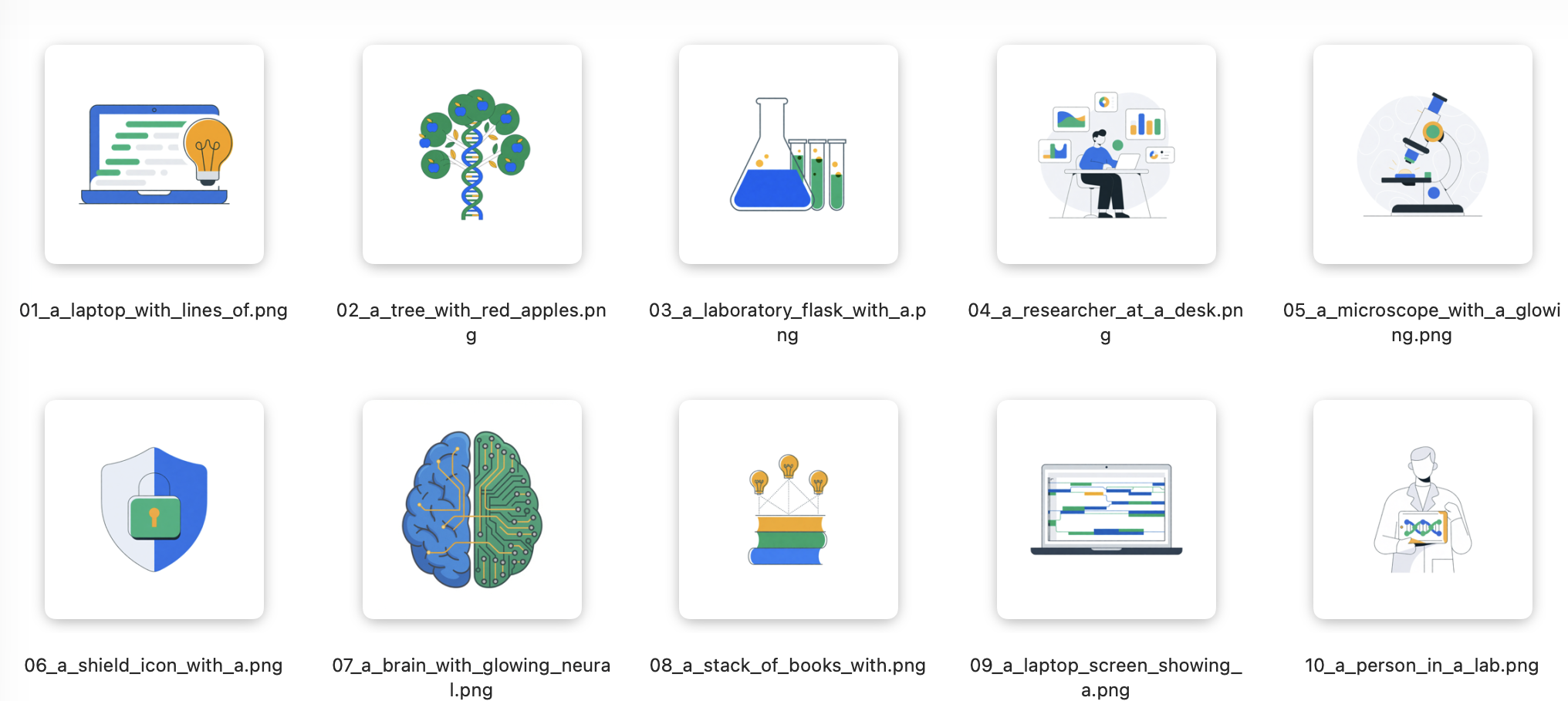
The previous page was about describing existing images. This page is the opposite: generating new images — specifically, a set of illustrations for a slide deck that all share a consistent style and colour palette.
 This is a real use case. You need a set of icons or spot illustrations for
a talk, and you want them to look like they belong together — not a random
collection of clip art.
The Challenge: Consistency
If you ask an image generator 10 times for “a laptop” with no constraints, you get 10 completely different styles. For a presentation, you need visual coherence:
- Same illustration style
- Same colour palette
- Same level of detail
- Same background treatment
The solution: a style prompt that defines these constraints once, then a list of subjects to render in that style.
Step 1: Define the Style
This is the critical part. The prompt must be detailed enough that every generated image feels like part of the same set.
STYLE_PROMPT = """Create a flat vector illustration in a clean, modern style
suitable for a scientific presentation slide.

STYLE REQUIREMENTS:
- Flat design with no gradients, no shadows, no 3D effects
- Clean, thin outlines (1-2px, dark grey #333333)
- Solid fills only, no textures or patterns
- Centered composition with generous padding
- Transparent or pure white (#FFFFFF) background

COLOUR PALETTE (use ONLY these colours):
- Primary: #2563EB (vivid blue)
- Secondary: #10B981 (emerald green)
- Accent: #F59E0B (amber yellow)
- Dark: #1E293B (slate grey, for outlines and text)
- Light: #F1F5F9 (pale grey, for subtle elements only)

COMPOSITION:
- Subject centered and filling 60-70% of the frame
- No text, no labels, no UI elements (unless specified)
- Square format (1024x1024)
- Clean, minimal, professional — like modern tech company illustration style
"""
Step 2: Create a Subject List
Create a list.txt file — one subject per line. The script reads this and
generates one image for each line.
A laptop with lines of code streaming from the screen, and a glowing lightbulb next to it
A tree with red apples and a DNA helix woven into its trunk
A laboratory flask with a bright blue liquid and a row of test tubes in emerald green
A researcher at a desk surrounded by floating data visualizations and charts
A microscope with a glowing sample on the slide, abstract cellular patterns behind it
A shield icon with a lock symbol embedded in it, representing data security
A brain with glowing neural connections, half organic and half circuit-board
A stack of books with lightbulbs floating above them, connected by dotted lines
A laptop screen showing a simplified genome browser track in blue and green
A person in a lab coat holding a tablet with a DNA sequence displayed on screen
Step 3: The Script
This script reads list.txt, sends each subject to the image generation API
with the style prompt, and saves the results.
 You will need to adapt the script based on the API documentation for the image model!
import os
import json
import time
import base64
from pathlib import Path
from dotenv import load_dotenv
from openai import OpenAI

load_dotenv()

client = OpenAI(
    base_url="https://openrouter.ai/api/v1",
    api_key=os.environ["OPENROUTER_API_KEY"],
)

# --- CONFIGURATION ---
SUBJECTS_FILE = "list.txt"
OUTPUT_DIR = "generated_images"
MODEL = "openai/dall-e-3"  # or another image generation model on OpenRouter

STYLE_PROMPT = """Create a flat vector illustration in a clean, modern style
suitable for a scientific presentation slide.

STYLE REQUIREMENTS:
- Flat design with no gradients, no shadows, no 3D effects
- Clean, thin outlines (1-2px, dark grey #333333)
- Solid fills only, no textures or patterns
- Centered composition with generous padding
- Transparent or pure white (#FFFFFF) background

COLOUR PALETTE (use ONLY these colours):
- Primary: #2563EB (vivid blue)
- Secondary: #10B981 (emerald green)
- Accent: #F59E0B (amber yellow)
- Dark: #1E293B (slate grey, for outlines and text)
- Light: #F1F5F9 (pale grey, for subtle elements only)

COMPOSITION:
- Subject centered and filling 60-70% of the frame
- No text, no labels, no UI elements (unless specified)
- Square format (1024x1024)
- Clean, minimal, professional — like modern tech company illustration style
"""


def read_subjects(filepath):
    """Read subjects from list.txt, ignoring blank lines and comments."""
    subjects = []
    with open(filepath) as f:
        for line in f:
            line = line.strip()
            if line and not line.startswith("#"):
                subjects.append(line)
    return subjects


def sanitise_filename(subject):
    """Turn a subject description into a safe filename."""
    # Take first 4 words, remove non-alphanumeric, lowercase
    words = subject.lower().split()[:5]
    safe = "".join(c if c.isalnum() else "_" for c in "_".join(words))
    return safe.rstrip("_")


def generate_image(subject):
    """Generate one image using the subject and style prompt."""
    full_prompt = f"{STYLE_PROMPT}\n\nSUBJECT: {subject}"

    response = client.images.generate(
        model=MODEL,
        prompt=full_prompt,
        size="1024x1024",
        quality="standard",
        n=1,
    )

    return response.data[0]


def main():
    subjects = read_subjects(SUBJECTS_FILE)

    if not subjects:
        print(f"No subjects found in {SUBJECTS_FILE}")
        return

    output_path = Path(OUTPUT_DIR)
    output_path.mkdir(exist_ok=True)

    print(f"Generating {len(subjects)} images...\n")

    for i, subject in enumerate(subjects, 1):
        fname = sanitise_filename(subject)

        print(f"[{i}/{len(subjects)}] {subject[:60]}...")
        print(f"  Style prompt: {len(STYLE_PROMPT)} chars of style definition")
        print(f"  Full prompt length: {len(STYLE_PROMPT) + len(subject)} chars")

        try:
            result = generate_image(subject)

            if result.url:
                print(f"  URL: {result.url[:80]}...")
                # Download the image
                import urllib.request
                img_path = output_path / f"{i:02d}_{fname}.png"
                urllib.request.urlretrieve(result.url, img_path)
                print(f"  Saved: {img_path}")
            elif result.b64_json:
                # Some APIs return base64 directly
                img_path = output_path / f"{i:02d}_{fname}.png"
                with open(img_path, "wb") as f:
                    f.write(base64.b64decode(result.b64_json))
                print(f"  Saved: {img_path}")

            print()
        except Exception as e:
            print(f"  FAILED: {e}\n")

        # Be polite to the API
        if i < len(subjects):
            time.sleep(1)

    print(f"Done! Images saved in {OUTPUT_DIR}/")


if __name__ == "__main__":
    main()
What’s Happening Here
-
list.txtcontains one subject per line — easy to edit, easy to version-control -
STYLE_PROMPTis prepended to every subject, ensuring visual consistency - The script loops through subjects, calls the image API, and saves each result
- Files are named sequentially (
01_laptop_with_lines_of.png) for slide ordering
Why This Approach Works
| Without style prompt | With style prompt |
|---|---|
| 10 random illustrations in mismatched styles | 10 cohesive illustrations that look like a set |
| Inconsistent colour schemes | Uniform blue/green/amber palette |
| Mixed levels of detail | Consistent flat-vector look |
| Some with backgrounds, some without | All transparent/white backgrounds |
| Unprofessional patchwork | Ready-to-use slide deck illustrations |
Adapting the Style
You can swap the STYLE_PROMPT for different looks:
Watercolour scientific illustration:
Create a watercolour scientific illustration style. Soft washes of colour,
visible paper texture, muted earthy palette (olive green #6B8E23, terracotta
#CD5C5C, cream #FFF8DC, charcoal #36454F). Hand-drawn ink outlines with slight
irregularity. Vintage naturalist notebook aesthetic.
Dark-mode presentation style:
Dark background (#0F172A), neon accents. Use ONLY: cyan #06B6D4, magenta #D946EF,
white #F8FAFC. Glowing outlines, no fills. Futuristic but clean.
Pro tip: Save your style prompts in a styles/ folder so you can reuse
them across projects.
Cost Note
Image generation is more expensive than text generation.
For a talk with 10 illustrations: ~$0.50–0.80 total. For a budget-friendly alternative, check openrouter.ai/models and filter by “image” capability.
 Next: more advanced patterns and use cases.